DMG Mode Theme
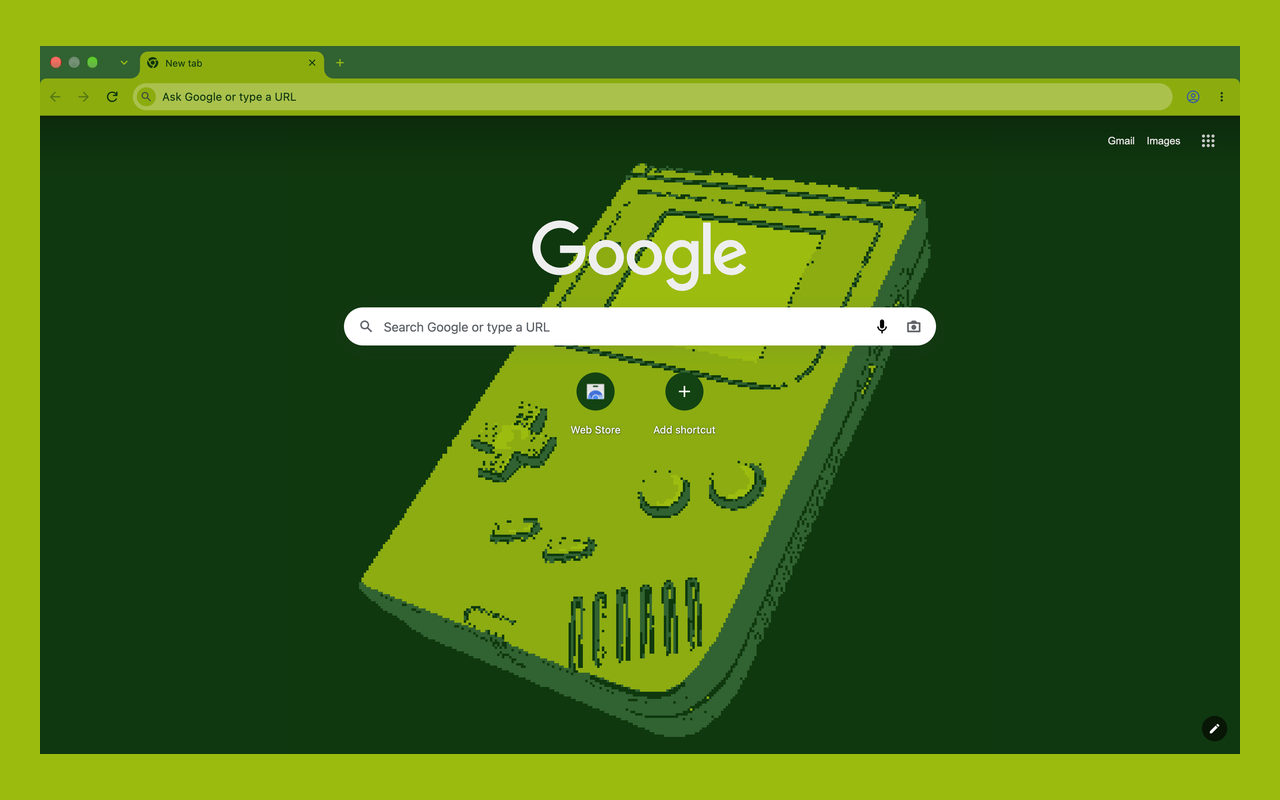
Chrome itself in four shades of green: frame, tabs, toolbar and New Tab page, like a classic handheld LCD.
What it is
DMG Mode Theme is a Chrome theme in the same 4-shade pea-green palette as the DMG Mode extension. The extension recolours the pages you visit; the theme recolours the browser around them, so the whole window matches.
It's free and open source. A theme is only colours and one image: it has no code, asks for no permissions and can't see what you browse.
What it changes
FRAME & TABS
The window frame and background tabs are #306230, dropping to #0f380f when the window is unfocused or incognito.
TOOLBAR
The active tab and toolbar are #8bac0f, with the address bar a shade lighter at #9bbc0f.
NEW TAB PAGE
A #0f380f background with a pixelated Game Boy in the centre, drawn in the same four shades.
TEXT & ICONS
Toolbar text, bookmarks and icons use the darkest shade, so everything stays readable.
Quick start
1. Install it from the Chrome Web Store and click Add to Chrome. The theme applies straight away.
2. To go back, open chrome://settings/appearance and click Reset to default.
3. Add the DMG Mode extension if you want the web pages green too.
Want to hack on it? Clone the repo and load the theme/ folder with Load unpacked in Developer mode. The repo also builds a Firefox version; the README has the steps.
GET DMG MODE THEME
The handheld image is made from Nintendo Game Boy 1989 - High Poly Model by lion.gelders, licensed under CC BY 4.0, rendered to a still, pixelated and reduced to four shades.
Game Boy is a trademark of Nintendo. Zapski.com is not affiliated with, endorsed by or sponsored by Nintendo.